
AI-generated writing has improved dramatically.
The problem is that readers have improved at recognizing it, too.
Even when an AI-written paragraph is grammatically correct, it can still feel strangely predictable. Sentences follow similar patterns. Introductions sound generic. Every paragraph ends with a neat conclusion. Certain words and transitions appear again and again.
That’s where tools like UltraHumanizer come in.
UltraHumanizer is designed to rewrite AI-generated text so it reads more naturally without changing the core message.
Unlike a general AI writer, it isn’t trying to research a topic, generate a complete article, or replace your writing workflow.
It focuses on one specific task:
making AI-assisted writing feel less like AI writing.
In this UltraHumanizer review, we’ll look at how it works, its strongest features, its limitations, and whether it’s worth using in 2026.
UltraHumanizer at a Glance
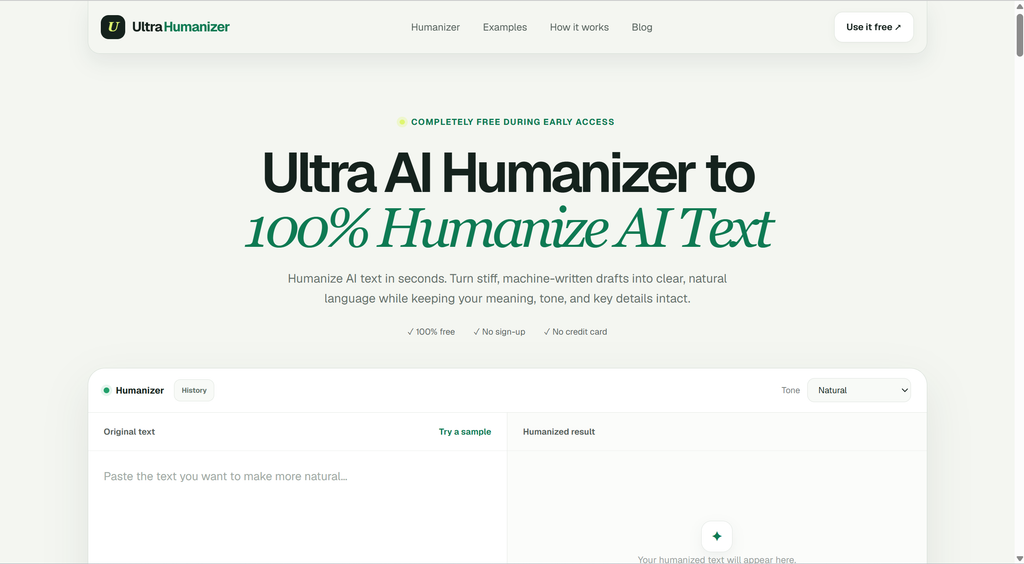
UltraHumanizer is an online AI text humanizer.
You paste in AI-generated text, select how you want the rewritten content to sound, and the tool generates a more natural version.
It can be useful for content created with ChatGPT, Claude, Gemini, and other AI writing tools.
Some of the main features include:
- AI-to-human text rewriting
- Natural, Conversational, and Professional modes
- Up to 1,500 words per request
- Support for 30+ languages
- No account required
- Free access during early access
- Keyword and meaning preservation
- More varied sentence structure
The interface is intentionally simple.
There are no complicated dashboards, templates, workspaces, or dozens of unrelated AI tools competing for your attention.
For an AI humanizer, that’s arguably a good thing.
What Problem Does UltraHumanizer Solve?
The real problem with AI writing isn’t necessarily grammar.
In fact, AI tends to be too grammatically consistent.
The problem is predictability.
AI-generated content frequently includes patterns such as:
- Similar sentence lengths
- Excessive transitional phrases
- Overly balanced paragraphs
- Generic conclusions
- Repeated sentence structures
- Unnecessary formal language
- Corporate-style buzzwords
- Obvious introductory phrases
For example:
In today’s rapidly evolving digital landscape, businesses must leverage innovative technologies to remain competitive and achieve sustainable growth.
There’s technically nothing wrong with that sentence.
But it sounds like something you’ve probably read hundreds of times.
A human writer might simply say:
Technology is changing quickly, and businesses that adapt faster usually have an advantage.
The second version isn’t necessarily more sophisticated.
It simply feels more natural.
UltraHumanizer is built around making these kinds of changes automatically.
How to Use UltraHumanizer
UltraHumanizer doesn’t require much explanation.
1. Paste Your Content
Start by adding your AI-generated text to the editor.
This might be:
- A blog article
- An email
- A report
- A product description
- A social media post
- A marketing page
- An essay draft
- A script
The current version allows up to 1,500 words in a single request.
For longer documents, you’ll need to process the content in sections.
2. Select a Writing Style
UltraHumanizer currently provides three main modes.
Natural
Natural is the safest general-purpose option.
It aims to make text flow better without making it dramatically more casual or formal.
For most blog posts and general content, this is probably the mode to start with.
Conversational
Conversational produces a more relaxed tone.
It’s better suited to content such as:
- Blog posts
- Newsletters
- Social media copy
- Personal brands
- Marketing content
It can help when an AI-generated draft sounds too polished or corporate.
Professional
Professional keeps the language more formal.
It makes more sense for:
- Business communication
- Client emails
- Reports
- Professional documents
- Corporate content
Having separate modes is useful because “human-sounding” doesn’t always mean “casual.”
A professional report can still sound natural without sounding like a Reddit post.
3. Generate the Humanized Version
Once you’ve selected a mode, UltraHumanizer rewrites the text.
The most noticeable changes tend to involve sentence structure rather than individual words.
A good humanizer shouldn’t simply turn:
“important”
into:
“crucial.”
That’s traditional paraphrasing.
Instead, the better approach is often to rewrite the sentence itself.
This distinction is important when comparing UltraHumanizer with ordinary paraphrasing tools.
UltraHumanizer Isn’t Just a Paraphraser
AI humanizers and paraphrasing tools overlap, but they’re not exactly the same.
Traditional paraphrasing software primarily tries to say the same thing using different words.
That can be useful for avoiding repetition.
But it doesn’t always fix robotic writing.
Imagine an AI generates:
It is important to note that businesses can benefit significantly from implementing artificial intelligence solutions in their daily operations.
A paraphraser might produce:
It is essential to mention that companies can benefit considerably from integrating artificial intelligence technologies into their everyday processes.
Different words.
Same robotic structure.
A humanized version might instead say:
AI can save businesses time on many everyday tasks.
The wording becomes simpler, but the sentence also becomes much more direct.
UltraHumanizer is designed around this broader style of rewriting.
What I Like About UltraHumanizer
The Interface Is Extremely Simple
Some AI tools have become unnecessarily complicated.
You log in and immediately see dozens of menus:
AI Writer.
AI Chat.
SEO Mode.
Templates.
Documents.
Projects.
Image Generator.
Detector.
Rewriter.
UltraHumanizer takes the opposite approach.
You give it text.
It humanizes the text.
That’s basically it.
For a utility product, simplicity is a major advantage.
It Focuses on Readability
One of the strongest reasons to use an AI humanizer isn’t actually AI detection.
It’s readability.
AI-generated drafts often contain too many words.
For example:
There are several different factors that individuals should take into consideration when making the decision to choose an appropriate career path.
A stronger version would simply be:
Several factors can influence your career choice.
A good humanizer removes some of this unnecessary complexity.
That’s useful regardless of whether anyone is checking the content with an AI detector.
Sentence Variation Makes a Noticeable Difference
Human writing isn’t perfectly consistent.
Sometimes we write long sentences.
Then a short one.
We might start one paragraph with a question and another with a direct statement.
AI tends to produce more consistent patterns.
UltraHumanizer attempts to introduce greater variation into sentence structure and length.
That helps the output feel less mechanical.
The Tone Options Are Practical
Three modes may not sound particularly impressive compared with tools offering dozens of presets.
In practice, Natural, Conversational, and Professional cover most common writing situations.
More options aren’t always better.
For most users, the real decision is simply:
Do I want this to sound neutral, casual, or professional?
UltraHumanizer keeps that decision simple.
It’s Useful for SEO Writers
SEO content is one of the clearest use cases for AI humanizers.
AI has made article production dramatically faster, but it has also created huge volumes of nearly identical content.
Search results are increasingly filled with articles containing phrases like:
- “In today’s digital age”
- “Whether you’re a beginner or an expert”
- “It is important to understand”
- “Let’s dive into”
- “By following these tips”
- “In conclusion”
Humanization can help remove those patterns.
UltraHumanizer is also designed to preserve important terms rather than unnecessarily replacing every keyword.
That’s especially important for SEO content.
If you’re targeting a phrase such as AI presentation maker, you probably don’t want a paraphrasing tool to replace it with an awkward synonym every time it appears.
UltraHumanizer for Blog Writing
Blogging is probably one of UltraHumanizer’s strongest use cases.
A practical workflow might look like this:
Research → AI draft → UltraHumanizer → human editing → publish
AI handles the initial structure.
UltraHumanizer cleans up repetitive AI patterns.
A human editor then adds expertise, examples, opinions, links, and factual verification.
This works better than expecting any single AI tool to produce a perfect publish-ready article.
Humanization should be considered one stage of editing rather than the entire content production process.
UltraHumanizer for Marketing
Marketing copy needs personality.
That’s something raw AI outputs often struggle with.
Consider this example:
Our cutting-edge solution empowers organizations to streamline workflows, increase productivity, and unlock their full potential.
This sounds professional.
It also says almost nothing.
Marketing content generally works better when it is specific and direct.
UltraHumanizer can help reduce some of the generic language common in AI-generated:
- Landing pages
- Product descriptions
- Emails
- Newsletters
- Social posts
- Ad drafts
- Promotional articles
I’d still recommend manually editing the final message to incorporate your brand voice.
Humanizing text doesn’t automatically make it good marketing.
UltraHumanizer for Professional Writing
Business users can benefit from AI humanization for a slightly different reason.
AI-generated business communication often sounds overly formal.
For example:
We would like to take this opportunity to inform you that your request has been received and is currently being reviewed by our team.
Most people would prefer:
We’ve received your request and our team is reviewing it now.
Same information.
Far less robotic.
Professional mode is therefore useful for making workplace communication clearer without turning it overly casual.
What About AI Detection?
This is inevitably one of the main questions surrounding products like UltraHumanizer.
Can it make AI-generated text less detectable?
Potentially.
Humanization changes many of the patterns AI detectors attempt to identify, including predictable sentence structures and repetitive language.
However, AI detection is far from perfect.
One detector might label the same text as 90% AI while another considers it mostly human.
Human-written work can also generate false positives.
For that reason, no legitimate AI humanizer can reliably promise that every piece of content will pass every AI detector.
I’d recommend judging UltraHumanizer primarily on the quality of its rewritten text.
Ask:
- Does the paragraph read naturally?
- Is the meaning still correct?
- Is it less repetitive?
- Are unnecessary words removed?
- Does the tone match the audience?
Those questions are more useful than chasing a particular detector percentage.
Does UltraHumanizer Work With ChatGPT Content?
Yes.
This is probably its most obvious use case.
You can use ChatGPT to generate:
- Blog outlines
- Articles
- Emails
- Social posts
- Reports
- Product descriptions
and then run the finished draft through UltraHumanizer before performing your final edit.
The same workflow can also be applied to content created with other large language models.
The tool isn’t dependent on a specific AI writer.
UltraHumanizer for Students
UltraHumanizer may also appeal to students because AI-assisted academic writing often sounds unnaturally formal.
However, there is an important distinction between improving your writing and trying to disguise prohibited AI use.
Academic institutions have different rules around AI.
Some allow AI for brainstorming and editing.
Others restrict its use heavily.
Students should always follow the relevant academic policies.
A sensible use of UltraHumanizer would be to improve awkward wording in material you’re allowed to edit with AI—not to misrepresent authorship.
Multilingual Content
UltraHumanizer supports more than 30 languages.
This can be particularly useful because AI-generated multilingual content frequently has a second problem beyond sounding robotic:
it sounds translated.
A sentence can be grammatically correct but still use phrasing that native speakers would rarely choose.
Humanization can help reduce this problem by making sentence structure and wording feel more natural.
Potential applications include:
- International SEO
- Localized landing pages
- Multilingual product descriptions
- Global marketing campaigns
- Translated blog content
As always, important commercial content should ideally receive a final review from a fluent or native speaker.
UltraHumanizer Pros and Cons
Pros
Simple to use
There is almost no learning curve.
No account required
You can start using the tool immediately.
Free during early access
The lack of an upfront subscription makes it easy to test.
Useful writing modes
Natural, Conversational, and Professional cover the majority of common use cases.
Focused product
UltraHumanizer isn’t overloaded with unrelated AI features.
Improves sentence rhythm
The rewriting goes beyond basic synonym replacement.
Supports multiple languages
The 30+ language support expands its usefulness for international content.
Good fit for AI-assisted SEO workflows
It can reduce repetitive AI phrasing while retaining important concepts and keywords.
Cons
1,500-word input limit
Long-form articles have to be processed in sections.
Human review is still necessary
No rewriting model should be trusted blindly with facts, names, numbers, or citations.
No guaranteed detector result
AI detectors change frequently and often disagree with each other.
Limited advanced controls
Users wanting highly granular style controls may find three modes relatively basic.
UltraHumanizer vs. Doing It Manually
You don’t technically need an AI humanizer.
A good editor can manually improve AI-generated text by:
- Removing filler
- Shortening sentences
- Breaking repetitive structures
- Replacing generic expressions
- Adding examples
- Changing paragraph rhythm
- Injecting personality
The problem is time.
If you’re editing one 500-word article, doing everything manually is easy.
If you’re working with 50 articles, hundreds of product descriptions, or regular marketing campaigns, the economics change.
That’s where UltraHumanizer becomes useful.
It handles the first editing pass.
You can then spend your time on higher-value improvements such as research, fact-checking, examples, positioning, and brand voice.
Who Is UltraHumanizer Best For?
UltraHumanizer makes the most sense for people who already use AI frequently.
SEO Content Teams
Useful for removing generic AI language from high-volume article production.
Freelance Writers
Helpful when using AI for research or first drafts while still wanting the final piece to sound natural.
Marketers
Good for cleaning up landing pages, emails, social content, and product copy.
Business Professionals
Can make AI-assisted emails and reports sound less stiff.
Bloggers
Useful as an editing layer between AI drafting and final publication.
Non-Native English Writers
Humanization can help smooth out phrases that may be grammatically correct but stylistically unnatural.
Who Probably Doesn’t Need UltraHumanizer?
UltraHumanizer isn’t necessary for everyone.
You probably don’t need it if:
- You don’t use AI-generated writing
- You already manually rewrite every draft
- Your AI writing tool consistently matches your preferred style
- You only write a small amount of content
- You need extensive fact-checking rather than style editing
It’s important to understand what category UltraHumanizer belongs to.
It is an editing tool, not a research platform or fact-checker.
Is UltraHumanizer Worth It?
At its current price—free—the answer is easy.
It’s worth trying.
There is little downside to testing a paragraph and comparing the result with your original draft.
The more interesting question is whether AI humanization itself deserves a place in modern writing workflows.
For people who create a significant amount of AI-assisted content, I think it does.
AI generation has become fast.
Editing is now the bottleneck.
A specialized humanizer can automate some of the repetitive editing work while allowing the writer to focus on substance.
UltraHumanizer’s focused approach makes it particularly appealing if you don’t want another complex AI writing suite.
UltraHumanizer Review: Final Verdict
UltraHumanizer solves a very specific problem, and that’s what makes it useful.
AI writing isn’t disappearing.
If anything, more content will be created with AI every year.
The challenge is making that content worth reading.
UltraHumanizer helps by reducing several characteristics associated with weak AI writing: excessive formality, predictable sentence patterns, unnecessary filler, and generic phrasing.
It won’t magically turn a bad article into a great one.
It won’t fact-check your claims.
And it can’t guarantee a particular score from an AI detector.
But that’s not really what a good AI humanizer should promise.
Its job is to give you a cleaner, more natural draft that requires less manual rewriting.
For bloggers, marketers, SEO teams, professionals, and other frequent AI users, that’s a useful proposition.
Overall Rating: 4.7/5
Best for: AI-assisted content writers, marketers, SEO professionals, bloggers, and business users.
Main advantage: Simple, focused AI humanization without requiring an account.
Main limitation: Long content must currently be processed in smaller sections.
If AI helps you write faster but you’re tired of manually removing robotic phrases from every draft, UltraHumanizer is an easy tool to add to your workflow.
Frequently Asked Questions
What is UltraHumanizer?
UltraHumanizer is an AI text humanizer that rewrites AI-generated content to make it sound more natural while attempting to maintain its original meaning.
Is UltraHumanizer free?
UltraHumanizer is currently available for free during its early-access period.
Do I need an account to use UltraHumanizer?
No. The current version can be used without creating an account.
Can UltraHumanizer humanize ChatGPT text?
Yes. You can paste text generated by ChatGPT or other AI writing platforms into UltraHumanizer and generate a more natural version.
What writing modes does UltraHumanizer offer?
UltraHumanizer currently provides Natural, Conversational, and Professional writing modes.
What is the UltraHumanizer word limit?
The current tool supports up to 1,500 words per request.
Can UltraHumanizer bypass AI detectors?
UltraHumanizer can rewrite patterns commonly associated with AI-generated writing, but no tool can guarantee that content will receive a specific result from every AI detector.
Is UltraHumanizer better than a paraphrasing tool?
They serve slightly different purposes. Paraphrasers mainly rewrite wording, while UltraHumanizer focuses specifically on making AI-generated writing feel more natural and less predictable.
Is UltraHumanizer good for SEO?
Yes. It can be particularly useful for improving AI-assisted SEO drafts while retaining important keywords and concepts.
Who should use UltraHumanizer?
It is best suited to bloggers, marketers, SEO professionals, freelancers, business users, and anyone who regularly edits AI-generated writing.
Leave a Reply